
There is a new way to sign life insurance applications in eApp.
PIN to Sign is ideal for life insurance applications completed during a video conference.
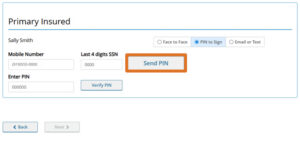
When you click “Send PIN,” a secure PIN is sent to the client by text. The client then reads the PIN back to you to authorize you to eSign on their behalf.
Here’s how it works:
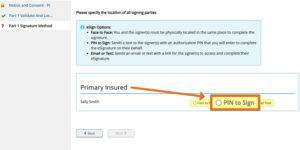
1. Choose “Electronic Signature” as the signature method and select “PIN to Sign.”
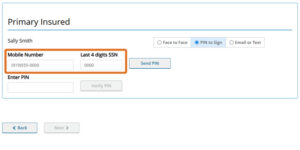
2. Verify the client’s mobile number and the last four digits of their SSN or ITIN, which will be pre-filled based on information provided earlier in the application process.
3. Click “Send PIN.” Your client will receive a 6-digit PIN via text message from 888-460-6435.
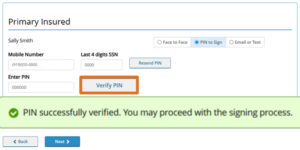
4. Enter the PIN provided by the client and click “Verify PIN.” Once verified, you are authorized to sign the HIPAA and/or the Application on their behalf.
Things to know:
- The phone number entered must belong to the client (not the agent).
- Multiple phone numbers can be used for applications with multiple signers.
- The signers PIN expires after 24 hours.
- PIN to Sign is available for both HIPAA authorization and the application. Different eSign methods may be used for each.
- Available for all life products.
Choosing the Right eSign Method:
- PIN to Sign is ideal for video conference applications. A secure PIN is sent to the client via text message, and the client provides the PIN to authorize you to eSign on their behalf.
- Email or Text is convenient for video conference applications. Clients receive a secure link by email or text message to review documents and complete the eSign process themselves.
- Face to Face is used when you and the client are meeting in the same location.
- The client takes control of your computer to complete the signing process.
- Face to Face may also be used during a video conference if the video conferencing app allows the client to take control and complete the eSign process themselves.
- If you use Face to Face during a video conference, it is strongly recommended to record the client completing the eSign process and to keep the recording with your policy file.
IMPORTANT: Agents are not allowed to eSign on their client’s behalf when using the Face to Face option.
In case you missed it: We also streamlined the application process for RapidProtect, instant decision life insurance. You can now generate a quick quote first.
TC8943719(0526)1