
Below, we’ve created a step-by-step guide on how to add our new Premium Chronic Care Rider when doing a term conversion. To get more details on the PCC Rider, click here.
Step 1
Run an illustration with the Premium Chronic Care Rider and other riders if desired.
Step 2
Open e-app and select the permanent product you are converting to
Step 3
Under “Pre-Qualification”, click on “Term Conversion eApplication”

Step 4
Complete the instructions with the current term policy number
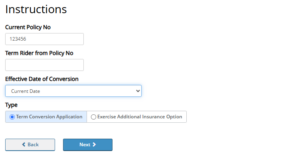
Step 5
Complete the Primary Insured Information and Beneficiaries information
Step 6
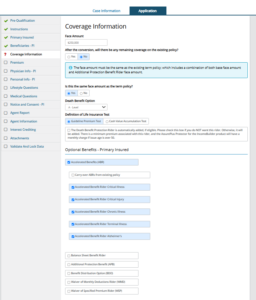
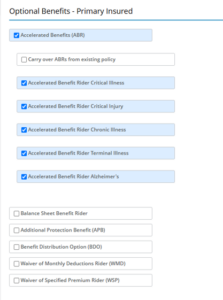
- On the Coverage tab, select all desired riders. If you are adding PCC, you must select Accelerated Benefits (ABR) and then click each Accelerated Benefits Rider – Critical Illness through Alzheimer’s.
- You will need to complete the Premium Chronic Care Supplement Application (20968) and the Premium Chronic Care Rider Disclosure (20969) and upload them at the end of the Term Conversation e-app; or you can upload them using the Upload A Form feature found in Quick Tools for your inforce Term Policy.
Step 7
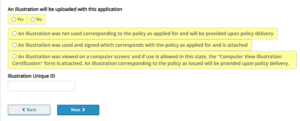
- You will have the option to upload an illustration at the end of the Term Conversation e-app; or you can upload it using the Upload A Form feature found in Quick Tools for your inforce Term Policy.
Step 8
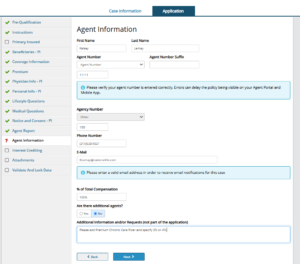
On the Agent Information tab, indicate that you would like to add Premium Chronic Care rider and the percentage desired.
Step 9
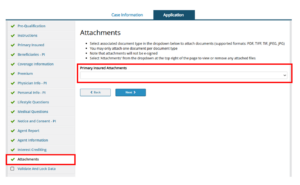
- You may upload the illustration by selecting Illustration in the Attachments dropdown.
- You may upload Premium Chronic Care Supplement Application and Premium Chronic Care Disclosure forms by selecting Other in the Attachments dropdown.
Step 10
- If you prefer to upload your illustration and/or Premium Chronic Care rider forms through your agent portal, select the term policy that is being converted from your Inforce Clients page.
- In the Quick Tools dropdown, select Upload a Form.

Step 11
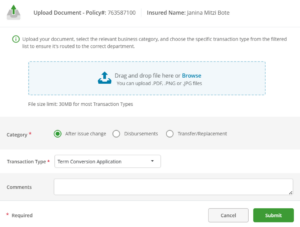
- Attach your forms in the blue box.
- Select After issue change category
- Select Term Conversion Application transaction type
- Add comments if needed and then click Submit.
TC8564353(1125)1